Palmyn Developer Documentation
Palmyn is a biometric identity platform that lets you protect your site from bots and authenticate real human users — verified by their hand scan, not a password.
There are two products you can integrate independently or together:
human_id and email — a frictionless biometric login without passwords or SMS codes.Same widget, two use cases. Both products use the same <script> tag and new PalmynAuth() call. The only difference is what you do with the token your backend receives.
Quickstart
Get Palmyn Captcha running on your site in under 5 minutes.
Call the register_site endpoint from your terminal to get a key pair. You only do this once per domain.
curl -s -X POST https://TU_DOMINIO.com/api/captcha.php \
  -H "Content-Type: application/json" \
  -d '{
    "q":            "register_site",
    "domain":       "miapp.com",
    "tier":         "basic",
    "admin_secret": "YOUR_PALMID_ADMIN_SECRET"
  }' | python3 -m json.tool
Response:
{
  "code": 200,
  "result": {
    "site_key":   "pk_live_a1b2c3d4e5f6...",
    "secret_key": "sk_live_z9y8x7w6...",
    "domain":     "miapp.com",
    "tier":       "basic"
  }
}Keep secret_key private — never expose it in frontend code. Store it as an environment variable on your server. The site_key is safe to embed in the widget.
Include the script and add a container element where the button should appear.
<!-- Placement: right before </body> -->
<div id="palmyn-captcha"></div>

<script src="https://TU_DOMINIO.com/api/widget/palmyn-auth.js"></script>
<script>
  new PalmynAuth({
    siteKey:   'pk_live_a1b2c3d4e5f6...',
    container: '#palmyn-captcha',
    onSuccess: function(token) {
      // Send token to your backend for verification
      document.getElementById('captcha-token').value = token;
    },
    onError: function(reason) {
      console.error('Palmyn error:', reason);
    },
  });
</script>When your form is submitted, verify the token using your secret_key. Never trust the frontend alone.
$token     = $_POST['palmyn_token'] ?? '';
$secretKey = getenv('PALMYN_SECRET_KEY'); // sk_live_...

$response = file_get_contents(
    'https://TU_DOMINIO.com/api/captcha.php'
    . '?q=siteverify'
    . '&secret=' . urlencode($secretKey)
    . '&token='  . urlencode($token)
);

$data = json_decode($response, true);

if (!$data['success']) {
    http_response_code(403);
    die('Verification failed: ' . implode(', ', $data['error-codes'] ?? []));
}

// $data['score'] — float 0.0–1.0 (confidence of being human)
// Continue processing the form...
echo 'Verified! Score: ' . $data['score'];
const https = require('https');
async function verifyPalmyn(token) {
const secret = process.env.PALMYN_SECRET_KEY; // sk_live_...
const url = `https://TU_DOMINIO.com/api/captcha.php`
+ `?q=siteverify&secret=${encodeURIComponent(secret)}`
+ `&token=${encodeURIComponent(token)}`;
const res = await fetch(url);
const data = await res.json();
if (!data.success) {
throw new Error('Palmyn verification failed: ' + (data['error-codes'] || []).join(', '));
}
return data; // { success, score, hostname, challenge_ts }
}
// Express route example
app.post('/submit', async (req, res) => {
try {
const result = await verifyPalmyn(req.body.palmyn_token);
console.log('Score:', result.score);
res.json({ ok: true });
} catch (err) {
res.status(403).json({ error: err.message });
}
});import os, requests
def verify_palmyn(token: str) -> dict:
secret = os.environ["PALMYN_SECRET_KEY"] # sk_live_...
r = requests.get(
"https://TU_DOMINIO.com/api/captcha.php",
params={"q": "siteverify", "secret": secret, "token": token},
timeout=5,
)
data = r.json()
if not data.get("success"):
codes = ", ".join(data.get("error-codes", []))
raise ValueError(f"Palmyn verification failed: {codes}")
return data # { "success": True, "score": 0.95, ... }
# Flask example
from flask import request, abort
@app.route("/submit", methods=["POST"])
def submit():
result = verify_palmyn(request.form.get("palmyn_token", ""))
print("Score:", result["score"])
return {"ok": True}That's it! Your site is now protected. Continue reading to understand all the options available.
Register a Site
Every domain that embeds the Palmyn widget must be registered. Registration creates a unique key pair tied to your domain.
| Key | Where it's used | Keep secret? |
|---|---|---|
site_key pk_live_... |
Passed to the widget in your HTML — visible to users | No — it's public |
secret_key sk_live_... |
Used only in your backend to call siteverify |
Yes — never expose |
Endpoint
POST https://TU_DOMINIO.com/api/captcha.php
Content-Type: application/json

{
  "q":            "register_site",
  "domain":       "miapp.com",
  "tier":         "basic",
  "admin_secret": "YOUR_PALMID_ADMIN_SECRET",
  "redirect_uri": "https://miapp.com/auth/palmyn/callback"  // optional, for Login with Palmyn
}
Tiers
| Tier | Description |
|---|---|
| basic | Standard behavior-based scoring + QR challenge when needed. |
| verified | Requires hand registration — only users with verified_level: 2 can pass. |
Captcha — How it works
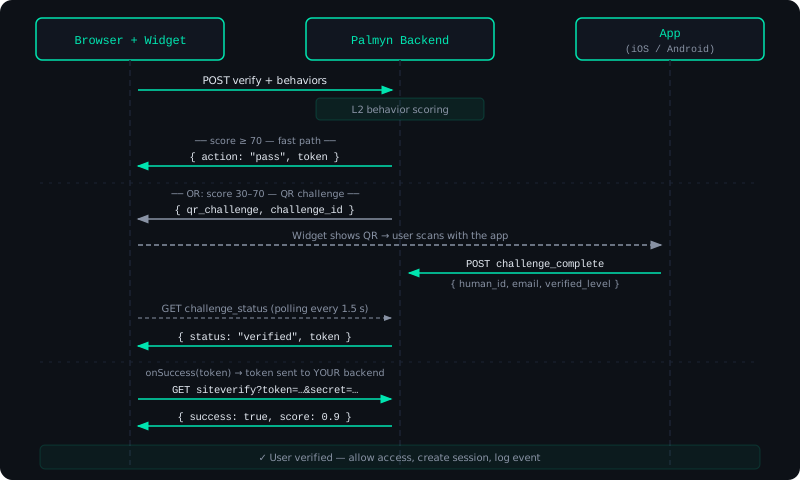
The widget invisibly tracks mouse movement, keyboard timing, and scroll patterns before the user even clicks. Most legitimate users pass automatically without ever seeing a QR code.
Install the Widget
<!-- 1. Add a container where the button should appear -->
<form id="my-form">
  <!-- your form fields -->
  <input type="hidden" id="palmyn-token" name="palmyn_token" />

  <div id="palmyn-captcha"></div>

  <button type="submit" id="submit-btn" disabled>Submit</button>
</form>

<!-- 2. Load the widget -->
<script src="https://TU_DOMINIO.com/api/widget/palmyn-auth.js"></script>
<script>
  new PalmynAuth({
    siteKey:   'pk_live_...',
    container: '#palmyn-captcha',
    label:     'Verificar & Continuar',   // optional: customize button text

    onSuccess: function(token) {
      document.getElementById('palmyn-token').value = token;
      document.getElementById('submit-btn').disabled = false;
    },

    onError: function(reason) {
      // reason: 'blocked' | 'expired' | 'error'
      alert('Verification failed. Please try again.');
    },
  });
</script>Important: Always verify the token on your server using siteverify. Never trust the frontend onSuccess callback alone — a user can forge it.
Verify the Token
After onSuccess fires, your frontend sends the token to your backend. Your backend calls siteverify with your secret_key.
Request
GET https://TU_DOMINIO.com/api/captcha.php
  ?q=siteverify
  &secret=sk_live_...
  &token=eyJhb...
Response
{
  "success":      true,
  "score":        0.97,
  "action":       "palm_challenge",
  "hostname":     "miapp.com",
  "challenge_ts": "2026-05-26T14:32:10+00:00"
}{
"success": false,
"error-codes": ["invalid-input-response"]
}Server-side verification
function palmyn_verify(string $token): array {
    $url = 'https://TU_DOMINIO.com/api/captcha.php'
         . '?q=siteverify'
         . '&secret=' . urlencode(getenv('PALMYN_SECRET_KEY'))
         . '&token='  . urlencode($token);

    $ctx  = stream_context_create(['http' => ['timeout' => 5]]);
    $body = file_get_contents($url, false, $ctx);
    $data = json_decode($body, true);

    if (!($data['success'] ?? false)) {
        throw new RuntimeException('Palmyn: ' . implode(', ', $data['error-codes'] ?? ['unknown']));
    }

    return $data;
}

// Usage
try {
    $result = palmyn_verify($_POST['palmyn_token'] ?? '');
    // $result['score'] — 0.0 to 1.0
    // Process form...
} catch (RuntimeException $e) {
    http_response_code(403);
    exit($e->getMessage());
}
async function palmynVerify(token) {
const url = new URL('https://TU_DOMINIO.com/api/captcha.php');
url.searchParams.set('q', 'siteverify');
url.searchParams.set('secret', process.env.PALMYN_SECRET_KEY);
url.searchParams.set('token', token);
const res = await fetch(url.toString());
const data = await res.json();
if (!data.success) {
throw new Error('Palmyn: ' + (data['error-codes'] || []).join(', '));
}
return data;
}
// Middleware example
async function requirePalmyn(req, res, next) {
try {
req.palmyn = await palmynVerify(req.body.palmyn_token || '');
next();
} catch (err) {
res.status(403).json({ error: err.message });
}
}
app.post('/submit', requirePalmyn, (req, res) => {
console.log('Score:', req.palmyn.score);
res.json({ ok: true });
});import os
import requests
from functools import wraps
from flask import request, abort, g
PALMYN_API = "https://TU_DOMINIO.com/api/captcha.php"
def palmyn_verify(token: str) -> dict:
r = requests.get(
PALMYN_API,
params={
"q": "siteverify",
"secret": os.environ["PALMYN_SECRET_KEY"],
"token": token,
},
timeout=5,
)
data = r.json()
if not data.get("success"):
codes = ", ".join(data.get("error-codes", ["unknown"]))
raise ValueError(f"Palmyn: {codes}")
return data
# Decorator for Flask routes
def require_palmyn(f):
@wraps(f)
def wrapper(*args, **kwargs):
token = request.form.get("palmyn_token") or request.json.get("palmyn_token", "")
g.palmyn = palmyn_verify(token)
return f(*args, **kwargs)
return wrapper
@app.route("/submit", methods=["POST"])
@require_palmyn
def submit():
print("Score:", g.palmyn["score"])
return {"ok": True}Silent Auth
If a user has already completed a palm scan in your site recently (within 24 h), you can skip the QR challenge entirely by passing their Palmyn session token. The user is verified instantly.
Silent auth must be explicitly enabled for your site (set allow_silent_auth: 1 in your site registration). It's opt-in.
How to enable
# Re-register or update your site with allow_silent_auth = 1
curl -X POST https://TU_DOMINIO.com/api/captcha.php \
  -H "Content-Type: application/json" \
  -d '{
    "q":                 "register_site",
    "domain":            "miapp.com",
    "allow_silent_auth": 1,
    "admin_secret":      "YOUR_PALMID_ADMIN_SECRET"
  }'
How to use it
When you initialize the widget, pass requireFresh: false and the Palmyn session token you stored after a previous successful verification.
// The palmyn_session was stored after a previous login
const palmynSession = localStorage.getItem('palmyn_session');

new PalmynAuth({
  siteKey:       'pk_live_...',
  container:     '#palmyn-captcha',
  requireFresh:  false,           // allow silent auth
  palmynSession: palmynSession,   // optional — omit if none
  onSuccess: function(token) { /* verify on server */ },
});
The palmyn_session token comes from the Palmyn app after the user completes a hand scan. It is not the secret_key — it is a short-lived token stored by the user's device.
Widget Configuration
| Option | Type | Description | |
|---|---|---|---|
| siteKey | string | required | Your public site key pk_live_... |
| container | string | Element | required | CSS selector or DOM element where the button renders |
| onSuccess | function(token) | required | Called with the verification token when the user passes |
| onError | function(reason) | optional | Called with 'blocked', 'expired', or 'error' |
| label | string | optional | Button label text. Default: "Continuar con Palmyn" |
| requireFresh | boolean | optional | Default true. Set to false to allow silent auth. |
| palmynSession | string | null | optional | Palmyn session token from a previous verification (enables silent auth) |
Login with Palmyn — How it works
Login with Palmyn adds identity to the captcha flow. When a user passes verification, your backend receives not just a score — but a verified identity: a stable human_id, their email, and their verification level.
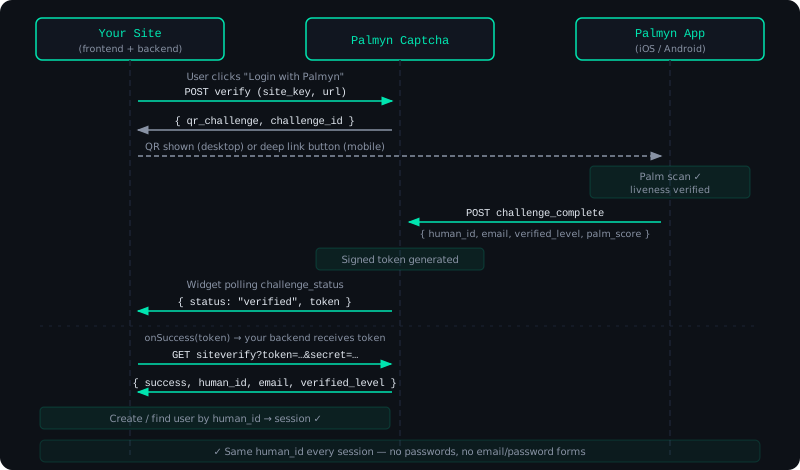
The human_id is the key concept. It's a stable, opaque identifier unique to each person — the same across all your services, but impossible to reverse-engineer back to their real identity.
Add the Login Button
The setup is identical to the captcha widget. Use a different label to make the intent clear:
<div id="palmyn-login"></div>

<script src="https://TU_DOMINIO.com/api/widget/palmyn-auth.js"></script>
<script>
  new PalmynAuth({
    siteKey:   'pk_live_...',
    container: '#palmyn-login',
    label:     'Continuar con Palmyn',  // or your preferred label

    onSuccess: async function(token) {
      // Send to your backend
      const res = await fetch('/auth/palmyn/callback', {
        method: 'POST',
        headers: { 'Content-Type': 'application/json' },
        body: JSON.stringify({ token }),
      });

      const { sessionCookie, redirect } = await res.json();
      window.location.href = redirect || '/dashboard';
    },

    onError: function(reason) {
      document.getElementById('login-error').textContent =
        reason === 'blocked'
          ? 'Verification failed. Are you human? 🤔'
          : 'Something went wrong. Please try again.';
    },
  });
</script>
Verify & Get User Identity
The siteverify response for Login with Palmyn includes the user's identity fields in addition to the score.
{
  "success":        true,
  "human_id":       "hid_a1b2c3d4e5f6a1b2c3d4e5f6a1b2c3d4",
  "email":          "usuario@ejemplo.com",
  "verified_level": 2,
  "score":          0.97,
  "action":         "palm_challenge",
  "hostname":       "miapp.com",
  "challenge_ts":   "2026-05-26T14:32:10+00:00"
}
Backend handler
function palmyn_login(string $token): array {
    $url = 'https://TU_DOMINIO.com/api/captcha.php'
         . '?q=siteverify'
         . '&secret=' . urlencode(getenv('PALMYN_SECRET_KEY'))
         . '&token='  . urlencode($token);

    $data = json_decode(file_get_contents($url), true);

    if (!($data['success'] ?? false)) {
        throw new RuntimeException('Verification failed');
    }

    $humanId       = $data['human_id'];        // "hid_..."
    $email         = $data['email'];            // "user@example.com"
    $verifiedLevel = (int)$data['verified_level']; // 0 | 1 | 2

    // Only allow users with biometric verification
    if ($verifiedLevel < 2) {
        throw new RuntimeException('Biometric verification required');
    }

    // Create or find user in YOUR database
    $user = DB::firstOrCreate(
        ['palmyn_id' => $humanId],
        ['email' => $email, 'name' => explode('@', $email)[0]]
    );

    return $user; // set your session cookie etc.
}

// Route handler
try {
    $user = palmyn_login($_POST['token'] ?? '');
    $_SESSION['user_id'] = $user['id'];
    header('Location: /dashboard');
} catch (RuntimeException $e) {
    http_response_code(403);
    echo json_encode(['error' => $e->getMessage()]);
}
// routes/auth.js
app.post('/auth/palmyn/callback', async (req, res) => {
try {
const url = new URL('https://TU_DOMINIO.com/api/captcha.php');
url.searchParams.set('q', 'siteverify');
url.searchParams.set('secret', process.env.PALMYN_SECRET_KEY);
url.searchParams.set('token', req.body.token || '');
const data = await fetch(url.toString()).then(r => r.json());
if (!data.success) throw new Error('Verification failed');
const { human_id, email, verified_level } = data;
// Only allow biometric-verified users
if (verified_level < 2) {
return res.status(403).json({ error: 'Biometric verification required' });
}
// Upsert user in your DB
const user = await prisma.user.upsert({
where: { palmynId: human_id },
create: { palmynId: human_id, email },
update: {},
});
// Set session
req.session.userId = user.id;
res.json({ redirect: '/dashboard' });
} catch (err) {
res.status(403).json({ error: err.message });
}
});# views/auth.py
import os, requests
from flask import request, session, redirect, abort
@app.route("/auth/palmyn/callback", methods=["POST"])
def palmyn_callback():
token = (request.json or {}).get("token", "")
r = requests.get(
"https://TU_DOMINIO.com/api/captcha.php",
params={
"q": "siteverify",
"secret": os.environ["PALMYN_SECRET_KEY"],
"token": token,
},
timeout=5,
)
data = r.json()
if not data.get("success"):
abort(403, "Verification failed")
human_id = data["human_id"] # "hid_..."
email = data["email"] # "user@example.com"
verified_level = int(data["verified_level"]) # 0 | 1 | 2
if verified_level < 2:
abort(403, "Biometric verification required")
# Upsert user in your DB
user = User.query.filter_by(palmyn_id=human_id).first()
if not user:
user = User(palmyn_id=human_id, email=email)
db.session.add(user)
db.session.commit()
session["user_id"] = user.id
return {"redirect": "/dashboard"}Verification Levels
Each user has a verified_level that reflects how far they've completed the Palmyn identity process.
Most sites should require verified_level >= 2 for Login with Palmyn. Level 1 is useful for gating low-risk features while the user sets up biometrics.
Mobile Deep Link
When the Palmyn widget detects a mobile browser, it automatically replaces the QR code with an "Open Palmyn App" button that deep links directly to the challenge.
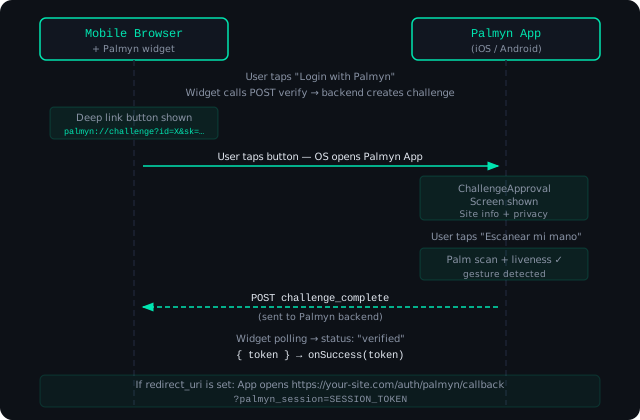
If your site is registered with a redirect_uri, the Palmyn app will automatically redirect to it after the scan:
https://miapp.com/auth/palmyn/callback?palmyn_session=TOKEN_HEREThe palmyn:// deep link only works if the user has the Palmyn app installed. Make sure to handle the case where the link doesn't open — display a fallback QR for desktop or instructions to install the app.
API Reference — captcha.php
Base URL: https://TU_DOMINIO.com/api/captcha.php
POST verify public
Called by the widget when a user interacts with the button. Returns an action decision.
| Field | Type | Description |
|---|---|---|
| q | string | Must be "verify" |
| sitekey | string | Your public pk_live_... key |
| behavior | array | Event array collected by the widget |
| device | object | Device fingerprint collected by the widget |
| url | string | Current page URL |
| require_fresh | boolean | Default true. Set false to allow silent auth. |
| palmyn_session | string? | Existing session token for silent auth |
POST challenge_status public
Polled by the widget to check if the user completed the QR challenge.
| Field | Type | Description |
|---|---|---|
| q | string | Must be "challenge_status" |
| challenge_id | string | Challenge ID returned by verify |
GET siteverify server-to-server
Validates a token returned by the widget. Call from your backend only.
| Param | Type | Description |
|---|---|---|
| q | string | Must be "siteverify" |
| secret | string | Your private sk_live_... key |
| token | string | Token received from widget onSuccess |
POST challenge_complete mobile app
Called by the Palmyn app after a successful palm scan. Not for third-party use.
POST get_site_info public
Returns the domain and tier for a site_key. Used by the app to display the site name before scanning.
| Field | Type | Description |
|---|---|---|
| q | string | Must be "get_site_info" |
| site_key | string | The site's public key |
POST register_site admin
Registers a new domain. Requires the admin secret.
| Field | Type | Description |
|---|---|---|
| q | string | Must be "register_site" |
| domain | string | Domain to authorize, e.g. miapp.com |
| tier | string | "basic" or "verified" |
| admin_secret | string | Your PALMID_ADMIN_SECRET from .env |
| redirect_uri | string? | Callback URL for mobile deep link flow |
| allow_silent_auth | int? | 0 or 1 — enable silent auth |
API Reference — identity.php
Base URL: https://TU_DOMINIO.com/api/identity.php
These endpoints are for users of the Palmyn mobile app (not for third-party site integrators).
POST check_auth_session public
Validates a Palmyn session token. Useful for backends that want to check session validity directly.
| Field | Type | Description |
|---|---|---|
| q | string | Must be "check_auth_session" |
| session_token | string | Token from the Palmyn app after a hand scan |
{
  "code": 200,
  "result": {
    "valid":          true,
    "human_id":       "hid_a1b2c3...",
    "email":          "user@example.com",
    "verified_level": 2,
    "expires_at":     1748397000
  }
}
Error Codes
| Code / error-code | Meaning |
|---|---|
| invalid-input-secret | The secret_key passed to siteverify is wrong or doesn't exist |
| invalid-input-response | The token is malformed, expired, or already used (tokens are single-use) |
| invalid_site_key | The site_key in the widget doesn't match any registered site |
| origin_not_allowed | The request Origin doesn't match the domain registered for this site_key |
| challenge_not_found | The challenge_id doesn't exist or expired |
| challenge_expired | The 3-minute challenge window passed without completion |
| unauthorized | Admin endpoint called without a valid admin_secret |
HTTP status codes
| Status | Meaning |
|---|---|
| 200 | Success — check the success / code field in the response body |
| 400 | Bad request — missing or invalid parameters |
| 401 | Unauthorized — invalid JWT or admin secret |
| 405 | Method not allowed — use POST (or GET for siteverify) |